Skip to content
CASE STUDY Founding Product Designer · Legal Tech SaaS

CaseNotes: AI meeting notetaker built for lawyers, not meetings.

Where every conversation is part of a case, and every record carries the weight of privilege.

CaseNotes: AI Meeting Notetaker for Lawyers cover preview
Role
Founding Product Designer (0-to-1)

Domain
Legal Tech SaaS · Matter Intelligence
Core Constraint
Privilege Preserved at Capture
Outcome
Cross-Matter Memory & 4 Scoped Views
01 / OVERVIEW
What is CaseNotes

An AI meeting notetaker built for legal privilege, not generic transcription.

CaseNotes is an AI meeting notetaker built specifically for lawyers who cannot treat sensitive client consultations like sales calls.

Designed around privilege, not just transcription. Every client conversation may become part of a case file, subject to discovery, privilege review, and bar association conduct rules. CaseNotes treats "can this record exist, and who can see it" as a core design constraint, not a buried settings toggle.

Built as matter memory, not an isolated meeting log. Summaries attach directly to active cases. Decisions, court deadlines, and privilege flags connect across the matter's lifecycle, routing straight to assignees without paralegals manually re-entering notes into practice management software.

The Opening Insight In 9 of the 12 client meetings shadowed during discovery, associates paused or stopped recordings the moment discussions turned toward settlement numbers or strategy, and scrambled afterward to reconstruct that part from memory. That is a structural flaw in general-purpose AI tools.
02 / THE FRICTION
The Problem

Every AI notetaker treats a meeting as a meeting. In law, a meeting is evidence.

Higher-accuracy transcription models do not solve the core failure modes of legal note-taking:

Scattered Matter Records

  • Case notes live scattered across practice management, document storage, calendars, and external notetakers.
  • Paralegals re-type identical notes, billing logs, and task lists across multiple tools after every call.
  • Critical details get lost or mistyped during manual copy-pasting between systems.

Privilege Waiver Risk

  • In United States v. Heppner, courts established that consumer AI platforms lack the fiduciary relationship required to preserve attorney-client privilege.
  • Passing client strategy through generic notetakers can waive privilege during discovery.
  • Lawyers are forced to choose between efficiency and malpractice exposure.

Zero Cross-Meeting Memory

  • General tools treat each meeting as an isolated file with no awareness of the overarching matter.
  • Nothing connects a settlement discussion in March to deposition preparation in October.
  • Case context is lost when associates rotate off files or leave the firm.
Legal Precedent United States v. Heppner, as highlighted by Mayer Brown: uncontrolled consumer AI transcription creates discoverable liabilities in litigation.
03 / COMPETITIVE AUDIT
Market Landscape

Auditing 12 tools: 3 out of 4 failure modes were legal risks, not UX complaints

General tools compete on raw transcription speed and automated email summaries. In legal practice, that ignores confidentiality requirements, privilege logs, and ethical walls.


Fireflies.ai

  • No privilege controls: every word captured is discoverable by default in litigation.
  • Intrusive meeting bot creates social friction and awkward moments on client calls.
  • No matter linkage: summaries live siloed in Fireflies rather than the active case file.
  • Consumer-grade data handling not aligned with bar rules of professional conduct.

Otter.ai

  • Same consumer-AI privilege exposure, with no fiduciary relationship under federal rules.
  • Past class-action lawsuits over recording consent practices erode client trust.
  • Arbitrary meeting length caps right at deposition prep durations.
  • Zero practice management or document management integration.

Fathom

  • Bot presence remains visible on calls despite marketing claims, creating exposure.
  • Lacks SOC 2 / ISO compliance configurations needed for legal-grade confidentiality.
  • Steep pricing jump from free to paid with no tier scaled for boutique law firms.
  • No concept of matters, case files, or privilege tiers across client interactions.
Direct Legal Competitor

Lua Legal

  • Pioneered "The Privilege-First Meeting AI" (Lua Notetaker & Assistant) with SOC 2, ISO 27001, and zero data retention.
  • Strong on live in-meeting assistance, post-meeting administrative drafts, and UTBMS billable time entries.
  • Where CaseNotes advances the category: Lua focuses on meeting-by-meeting notes. CaseNotes compounds intelligence into multi-session matter memory across months of litigation—connecting decisions directly to court dockets, statutory filing deadlines, and 4-tier ethical-wall scoping.
A meeting that needs a 14,000-word transcript to be useful wasn't a meeting. In a law firm, it's also a discovery liability waiting to happen.
04 / RESEARCH & THESIS
Discovery & Findings

Shadowing lawyers before drawing a screen: discovery on real legal constraints

I observed 12 live client meetings and case conferences across four small-to-midsize firms, conducted 7 follow-up interviews with partners, associates, and paralegals, and audited published AI notetaker guidance from Mayer Brown, Cahill, and the American Bar Association (ABA).
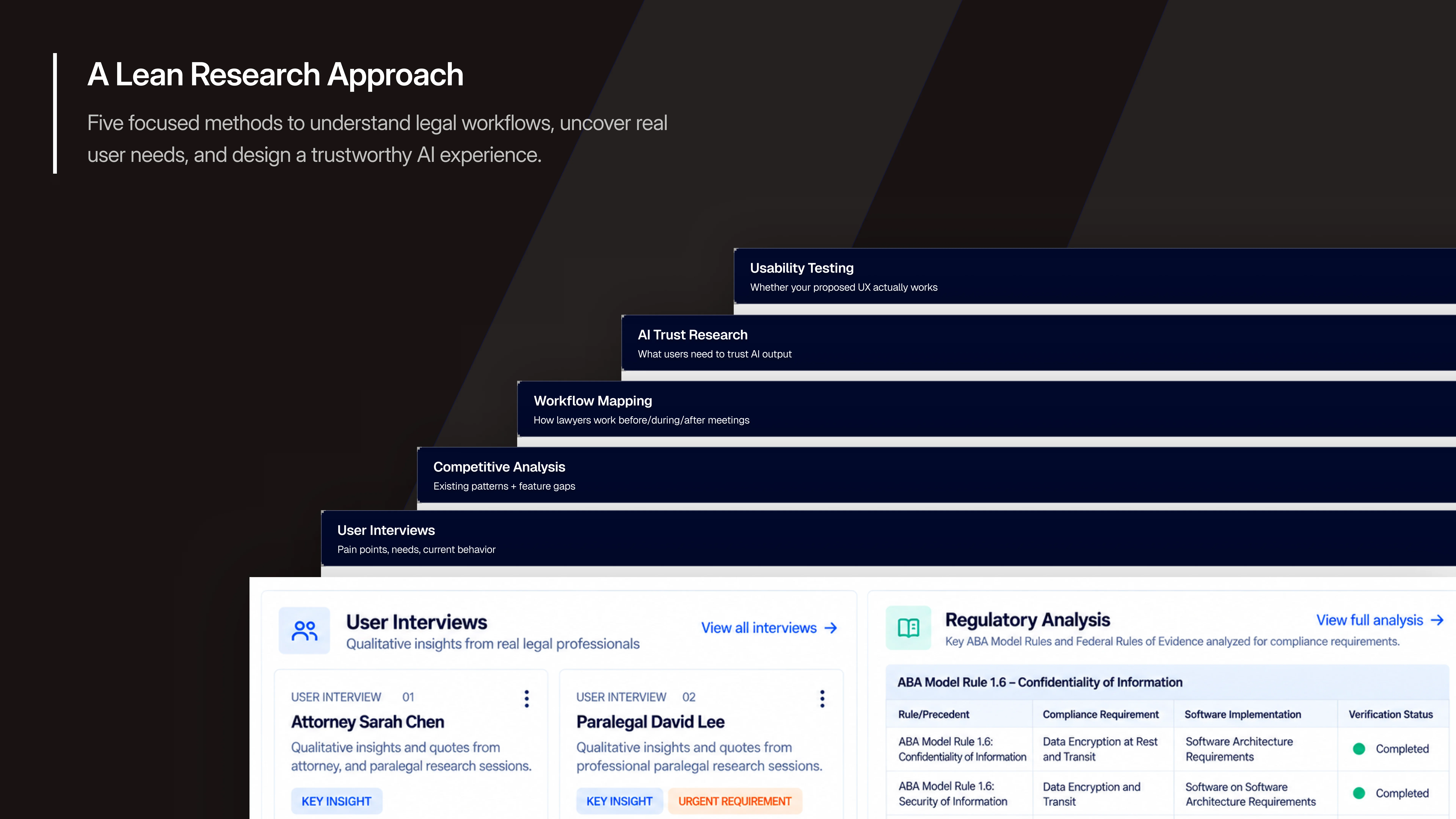
A Lean Research Approach — five focused methods including User Interviews, Competitive Analysis, Workflow Mapping, AI Trust Research, and Usability Testing, with qualitative insights from legal professionals and regulatory analysis against ABA Model Rules

1. Ad-Hoc Pauses

Associates used personal, undocumented rules to pause recorders during settlement talks, creating firm-wide inconsistency.

2. Paralegal Tax

Paralegals spent hours re-typing identical meeting notes into practice management software, document drives, and billing logs.

3. Meeting Boundaries

Lawyers treat internal team huddles and privileged client sessions differently, but standard tools handle both identically.

Lock icon

UNDER NDA

This work is confidential. I'd be happy to share this design over the call.

Confidential Design: Regulatory & Ethics Matrix — Translates findings from 12 client sessions and 7 attorney audits into product safeguards under ABA Model Rule 1.6(c) and FRE 502 privilege standards.

The Design Thesis

Principle 1: The lawyer controls whether a record exists in real time. A one-tap shortcut pauses capture mid-sentence and marks the segment privileged, going off the record without breaking conversational flow.

Principle 2: Every output is linked to a matter. Summaries attach directly to the case record, carry privilege tags, and stay restricted behind firm ethical walls.
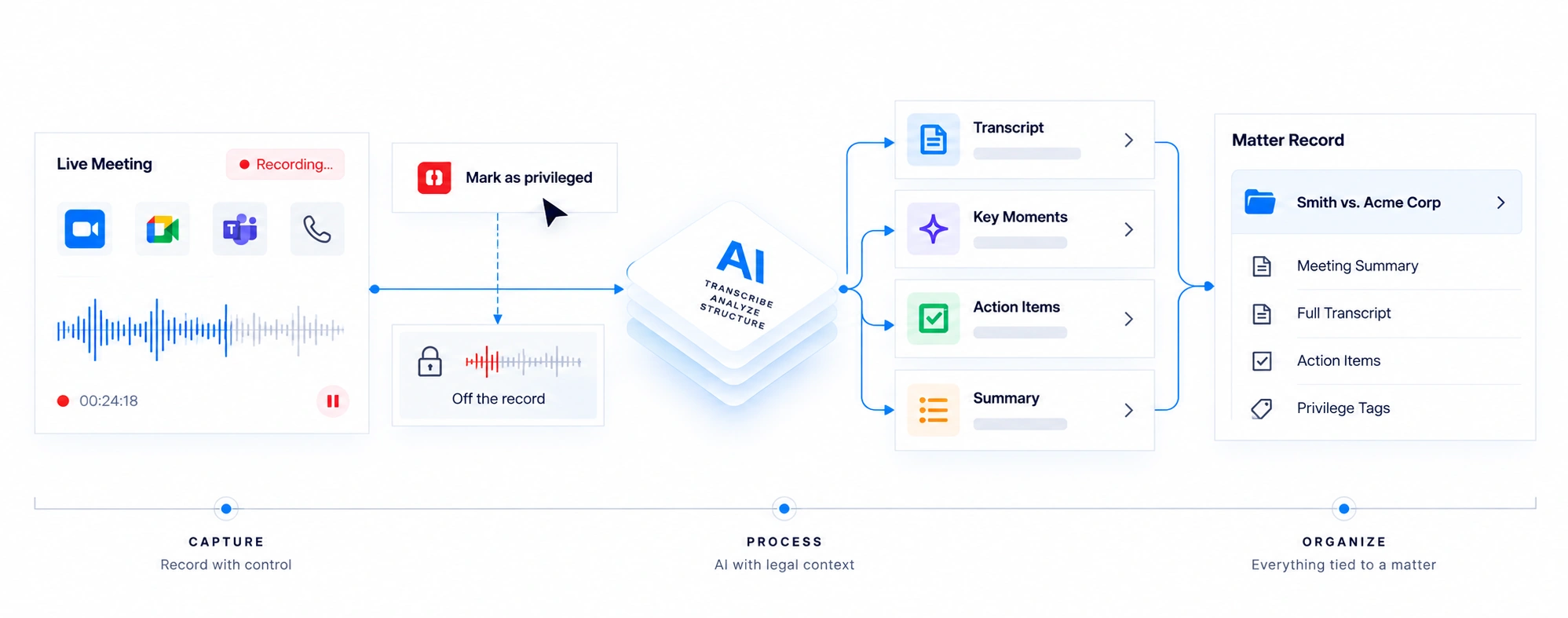
Confidential Architecture: Capture Gate & Intelligence Routing — Architectural blueprint of real-time audio capture control, ephemeral buffer quarantining, and role-scoped intelligence distribution
Confidential Architecture: Capture Gate & Intelligence Routing — Architectural blueprint of real-time audio capture control, ephemeral buffer quarantining, and role-scoped intelligence distribution.
05 / MEETING LIFECYCLE
End-to-End Workflow

One meeting, four moments: deciding if a record should exist at all

01. Matter tagging
→
02. Live meeting
→
03. Privilege review
→
04. Matter file
→
05. Case routing
→
06. Follow-up

1. Before: Tag the matter, inherit its defaults

CaseNotes links with firm calendars and practice management software. Before a meeting begins, it checks the matter assignment and applies inherited privilege defaults (litigation calls default to privileged and restricted; firm administrative meetings default to open).

Lock icon

UNDER NDA

This work is confidential. I'd be happy to share this design over the call.

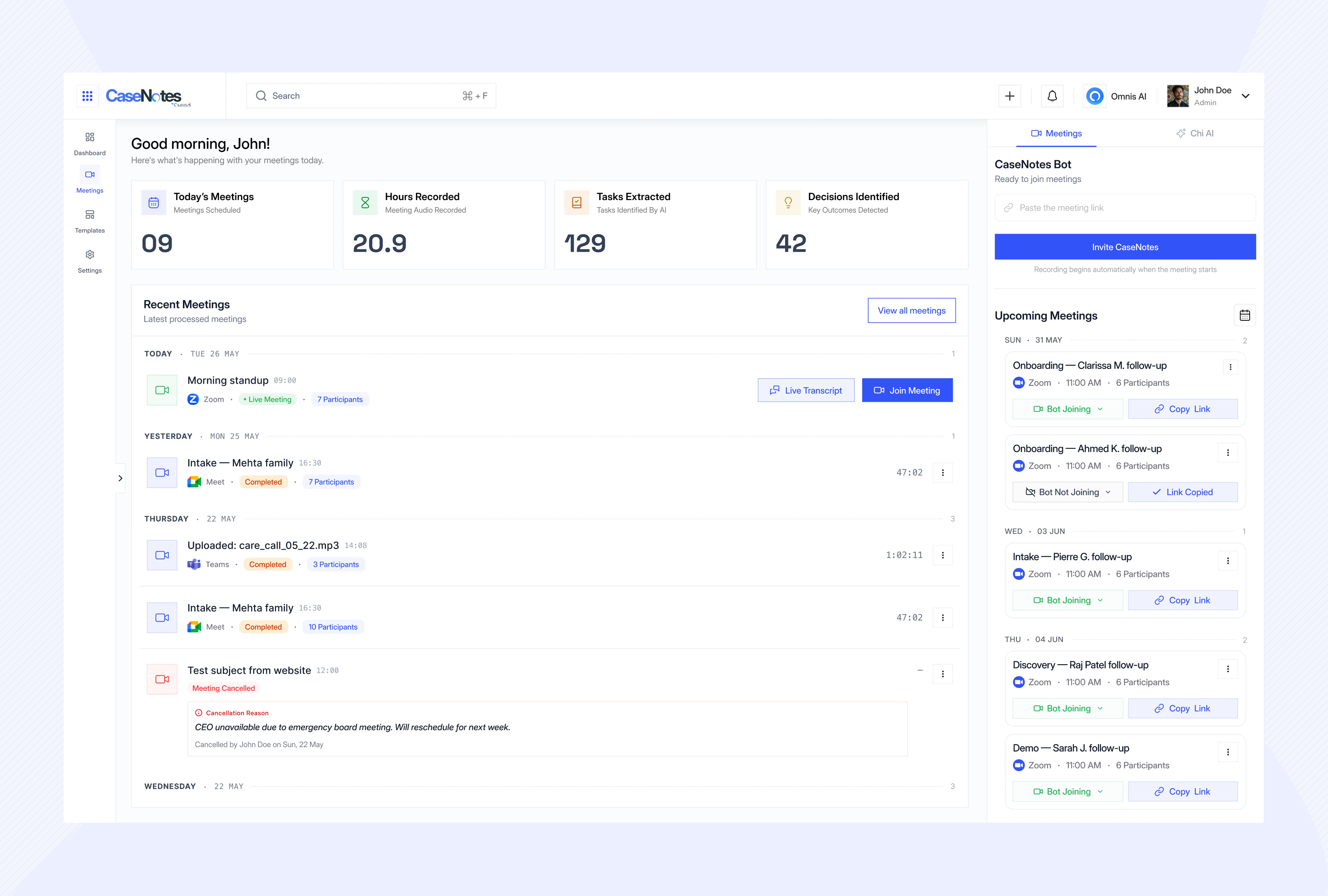
Confidential UI: CaseNotes Core Application Dashboard — Primary desktop workspace displaying matter navigation rail, active calendar sync, live call quick actions, and automated CaseNotes Bot joiner.

2. During: Minimal ambient UI & one-keystroke control

During calls, CaseNotes stays ambient: no bot avatars or scrolling transcript text. A discreet indicator shows recording status, and a single shortcut pauses capture for sensitive discussions.

Lock icon

UNDER NDA

This work is confidential. I'd be happy to share this design over the call.

Confidential UI: In-Meeting Live Capture Experience — Ambient in-call HUD featuring real-time speaker diarization, 1-keystroke off-the-record privilege pause (⌘+P), and parallel decision extraction.

3. After: Structured intelligence, filed where it belongs

Post-meeting summaries file directly to the case: context, decisions, assignees, deadlines, and segment-by-segment privilege tags. Raw transcripts remain in a secondary drawer to minimize discovery exposure.

Lock icon

UNDER NDA

This work is confidential. I'd be happy to share this design over the call.

Confidential UI: Post-Meeting Structured Summary File — Primary meeting intelligence record displaying matter metadata, executive brief, verified decisions, action items with UTBMS billing codes, and FRE 502 privilege classification.
The transcript is evidence. The summary is intelligence. In a law firm, shipping the transcript by default isn't just a UX miss; it creates a wider surface for a privilege fight.
06 / GROUNDED AI ENGINE
System Architecture

Grounded AI engine: zero-hallucination extraction & full privilege protection

In commercial litigation, an AI hallucination is not an interface hiccup; it is a legal liability that risks court sanctions, breach of client privilege, and disciplinary bar proceedings. Following landmark rulings like Mata v. Avianca and ABA Formal Opinion 512, CaseNotes was architected around a strict principle: all answers, summaries, and action items must be 100% derived from extracted meeting data—with zero invented facts.

Verbatim Extraction Invariant

Synthesizes only what was explicitly spoken. If an opposing party's argument or settlement term was not discussed, the system triggers an explicit refusal rather than inferring.

Timestamped Speaker Citations

Every synthesized point links to an immutable millisecond audio timestamp and verified biometric voiceprint for courtroom-grade evidentiary verification.

Zero-Retention Privilege Vault

Audio, transcripts, and embeddings reside in isolated private pods. Customer data is strictly never used to train foundation models, with cryptographic SHA-256 audit trails.

Lock icon

UNDER NDA

This work is confidential. I'd be happy to share this design over the call.

Confidential UI: Legal AI Workbench & Spoliation Governor — Interactive workbench featuring grounded fact extraction, 1-click privileged client letters, UTBMS billing export, and FRCP 37(e) record destruction controls.

How the pipeline turns 47 minutes into 5 matter-linked artifacts

Privilege detection and structured artifact extraction run in parallel across the meeting audio stream:

1
Audio → Diarized Transcript

Voice prints identify recurring participants. Unrecognized speakers are checked against the firm's conflict database to flag potential ethical breaches.

Conflict Check
2
Transcript → Topic Segmentation

The dialogue is split into logical topic blocks based on subject shifts rather than arbitrary minute intervals (~8 semantic blocks for a typical 45-minute session).

Semantic Chunking
3
Segments → Decisions, Actions & Privilege Suggestions

Settlement numbers and strategy points become Decisions. Commitments turn into Action Items with owners and dates. Work product phrasing is flagged for lawyer confirmation.

Automated Extraction
4
Segments → Key Moments

Consensus shifts and critical witness statements receive exact audio timestamps for rapid verification.

10s Audio Scrubbing
5
Assembly → Case Filing

Structured outputs bundle into the standardized case record and sync to practice tools under role-specific permission rules.

Single Model Call per Meeting
Lock icon

UNDER NDA

This work is confidential. I'd be happy to share this design over the call.

Confidential Pipeline: Dual-Track AI Extraction Flow — Technical flow showing raw audio diarization branching simultaneously into matter task extraction and real-time privilege detection.
Lock icon

UNDER NDA

This work is confidential. I'd be happy to share this design over the call.

Confidential Workflow: Privilege Confirmation & Override Modal — Attorney review interface with confidence scoring, 1-click privilege quarantining, and FRE 502 cryptographically logged audit trail.
07 / MATTER INTELLIGENCE
Cross-Matter Memory

Cross-matter memory: connecting discussions across the life of a case

Individual meeting notes expire in days. Cross-meeting case memory compounds over months of litigation:

Matter Timeline

Tracks how theories and settlement parameters evolve across multiple client and opposing counsel sessions.

Billable Follow-up Tracker

Drafts billable time entries matched to UTBMS activity codes alongside task checklists.

Privilege & Decision Log

Maintains an exportable registry of decisions tagged by privilege tier for discovery production.

Conflict Ledger

Audits attendee rosters against ongoing firm conflict checks to prevent inadvertent ethical walls breaches.

Team Coverage Insights

Monitors associate and paralegal case allocation to balance courtroom preparation workloads.

Deadline Gap Alerts

Flags commitments tied to statutory court filing deadlines that remain unassigned or incomplete.

Lock icon

UNDER NDA

This work is confidential. I'd be happy to share this design over the call.

Confidential UI: Conflict Ledger & Court Coverage Dashboard — Centralized matter health monitoring console displaying ethical wall conflict screening logs, attorney coverage schedules, and interactive court filing Gantt timelines.
08 / WORKFLOW INTEGRATION
Ecosystem Sync

Syncing where the case already lives: Clio, NetDocuments, and client portals

CaseNotes avoids standalone silos by syncing structured data directly into core legal software:

Lock icon

UNDER NDA

This work is confidential. I'd be happy to share this design over the call.

Confidential Architecture: Legal Ecosystem Sync & Privilege Gate — Systems integration blueprint showing two-way synchronization with Clio and NetDocuments, with an automated redaction gateway that strips privileged work-product before reaching external client portals.
09 / ROLE-BASED VIEWS
Multi-Role Architecture

Same matter, four roles: tailored for legal ethics and responsibilities

Partner View

Focuses on strategic decisions, exposure risk, billable time capture, and staffing.

Associate View

Prioritizes research tasks, motion drafting deadlines, and timestamped source citations.

Paralegal View

Tracks court filing dates, document requests, witness schedules, and docket items.

Client & In-House Portal Clients receive plain-language digests. Internal attorney work product, settlement strategy notes, and privileged discussions are stripped at the API layer before display.
Lock icon

UNDER NDA

This work is confidential. I'd be happy to share this design over the call.

Confidential UI: 4-Tier Role-Based Workspace Matrix — Side-by-side interface breakdown illustrating how CaseNotes dynamically adapts navigation, billing controls, and sensitive case materials across Partner, Senior Associate, Paralegal, and Client views.
10 / MOBILE COMPANION
Courtroom Mobility

Mobile companion ecosystem: desktop parity for attorneys in motion

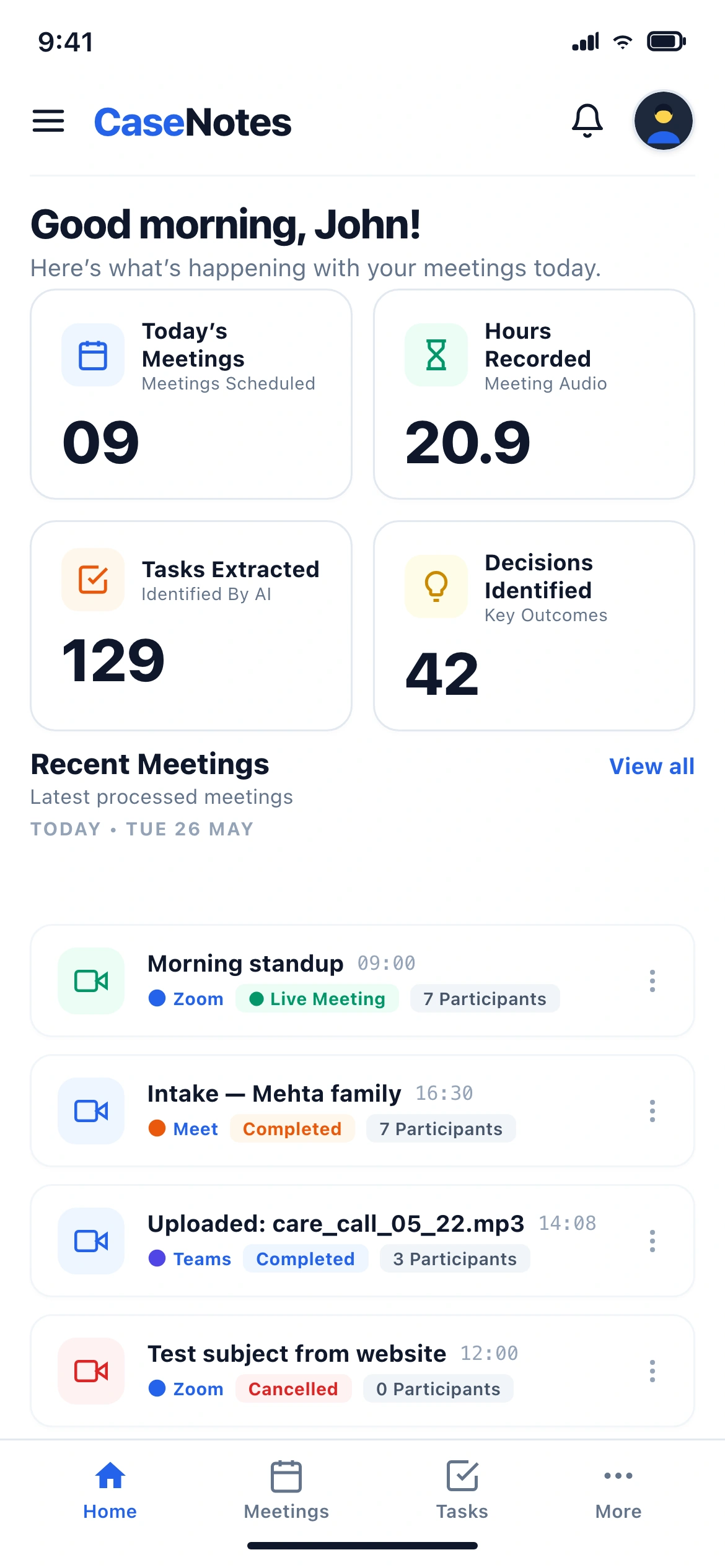
Litigators spend nearly 40% of their working hours away from their desks—walking between federal courtrooms, sitting in witness preparation rooms, or traveling to multi-day depositions. CaseNotes' mobile companion is not a stripped-down reader; it delivers full desktop parity tailored for mobile ergonomics: attending live hearings with one-tap privilege controls, reviewing instant post-meeting structured summaries, capturing UTBMS billable hours, and running grounded AI queries right from the courthouse corridor.

Live Meeting Attendance

Dial into sensitive client calls or depositions on mobile with real-time speaker diarization and a thumb-accessible 1-tap "Mark Privileged / Pause Capture" button to instantly quarantine confidential hallway conversations.

Instant Post-Meeting Summaries

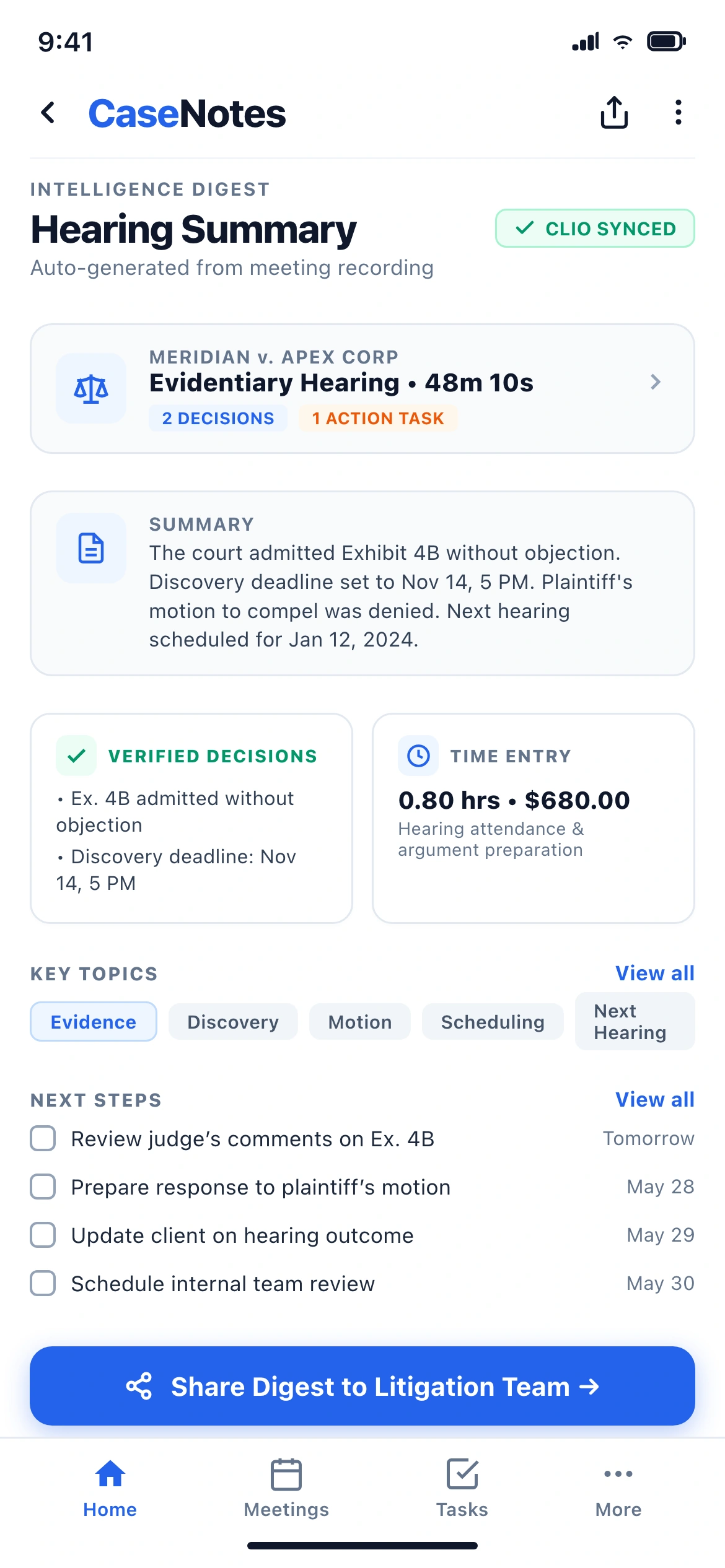
Receive verified executive digests within 10 seconds of hanging up. Review extracted decisions, assigned motion tasks, and auto-generated UTBMS billable time entries (e.g. 0.8h Code L120) with one-tap sync to Clio.

Grounded Mobile AI & Biometrics

Query the matter memory in plain English (e.g., "What did Dr. Moore concede regarding the patent priority date?") with zero hallucination, citing exact audio timestamps and protected by FaceID authentication.
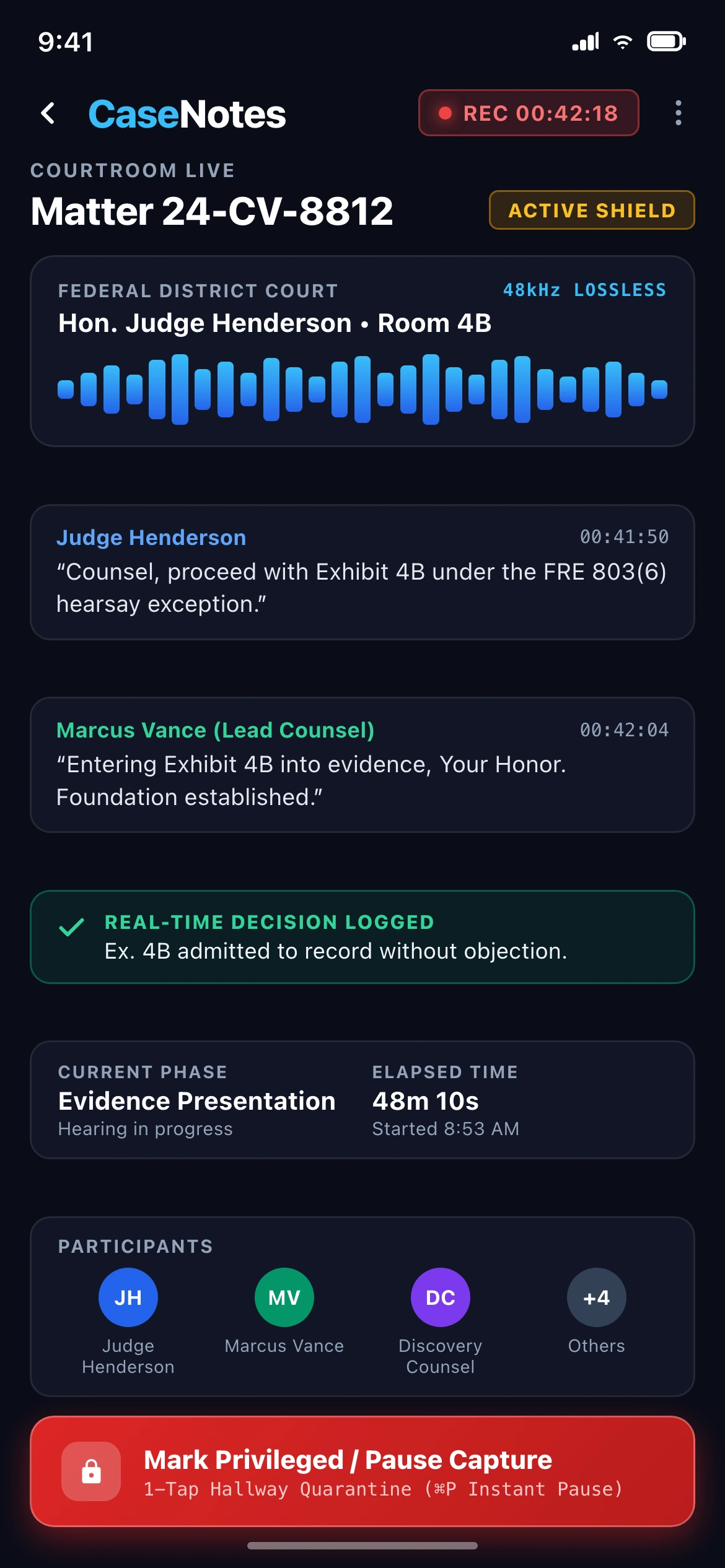
CaseNotes Mobile: Courtroom Live Hearing Attendance & 1-Tap Privilege Pause
CaseNotes Mobile: Daily Meeting Intelligence Dashboard & Practice Overview
CaseNotes Mobile: Intelligence Digest with Verified Decisions & UTBMS Time Entries
Confidential UI: Courthouse Mobile Companion (iOS & Android) — Three high-fidelity production viewports: real-time courtroom hearing attendance with 1-tap privilege quarantine, daily practice intelligence dashboard with automated metric tracking, and post-session intelligence digest with verified decisions and Clio-synced UTBMS billing.
11 / TRUST & COMPLIANCE
Visualising Security

Designing for ABA Formal Opinion 512 and SOC 2 / HIPAA security from day one

Legal AI products don't fail on features—they fail on trust. ABA Formal Opinion 512 requires attorneys to understand how their AI tools handle client data before using them. CaseNotes was designed to make compliance visible, not buried in a settings page.

Off-the-Record Indicator

When the capture gate is triggered, the UI shifts to a high-contrast visual state confirming that zero audio is being recorded or processed—no ambiguous icons, no buried toggles. Opposing counsel walks in? One tap, and the entire capture pipeline halts with full-screen confirmation.

Zero Data Retention UX

The interface explicitly communicates that raw audio and un-saved transcripts are ephemeral—permanently destroyed after the structured summary is generated. Every screen shows retention status so attorneys can answer client questions about data handling in real time.

Compliance-Forward Architecture

Designed from day one to support SOC 2 Type II, HIPAA/BAA, and ISO 27001 standards. Client data never trains third-party consumer LLMs—a non-negotiable constraint that shaped every AI pipeline decision.

ABA Formal Opinion 512 Compliance Attorneys must exercise "reasonable efforts" to ensure AI tools protect client confidentiality. CaseNotes surfaces data handling, retention policies, and privilege boundaries directly in the UI—so lawyers can demonstrate competent supervision without reading a 40-page privacy policy.
Lock icon

UNDER NDA

This work is confidential. I'd be happy to share this design over the call.

Confidential UI: Trust & Compliance Dashboard — Visual system showing real-time capture state indicators, zero-retention confirmation screens, and privilege gate UX patterns designed for ABA Formal Opinion 512 compliance.
12 / THE ECOSYSTEM
Native Integrations

CaseNotes inside the Omnis ecosystem: one platform for meetings, records, and case intelligence

CaseNotes doesn't live in isolation. It's designed as a core module within the broader Omnis ecosystem—a unified legal operations platform where meeting transcripts, medical chronologies, client communications, and case documents converge into a single matter-linked intelligence layer. Every meeting captured by CaseNotes becomes structured data that flows across the firm's entire tech stack.
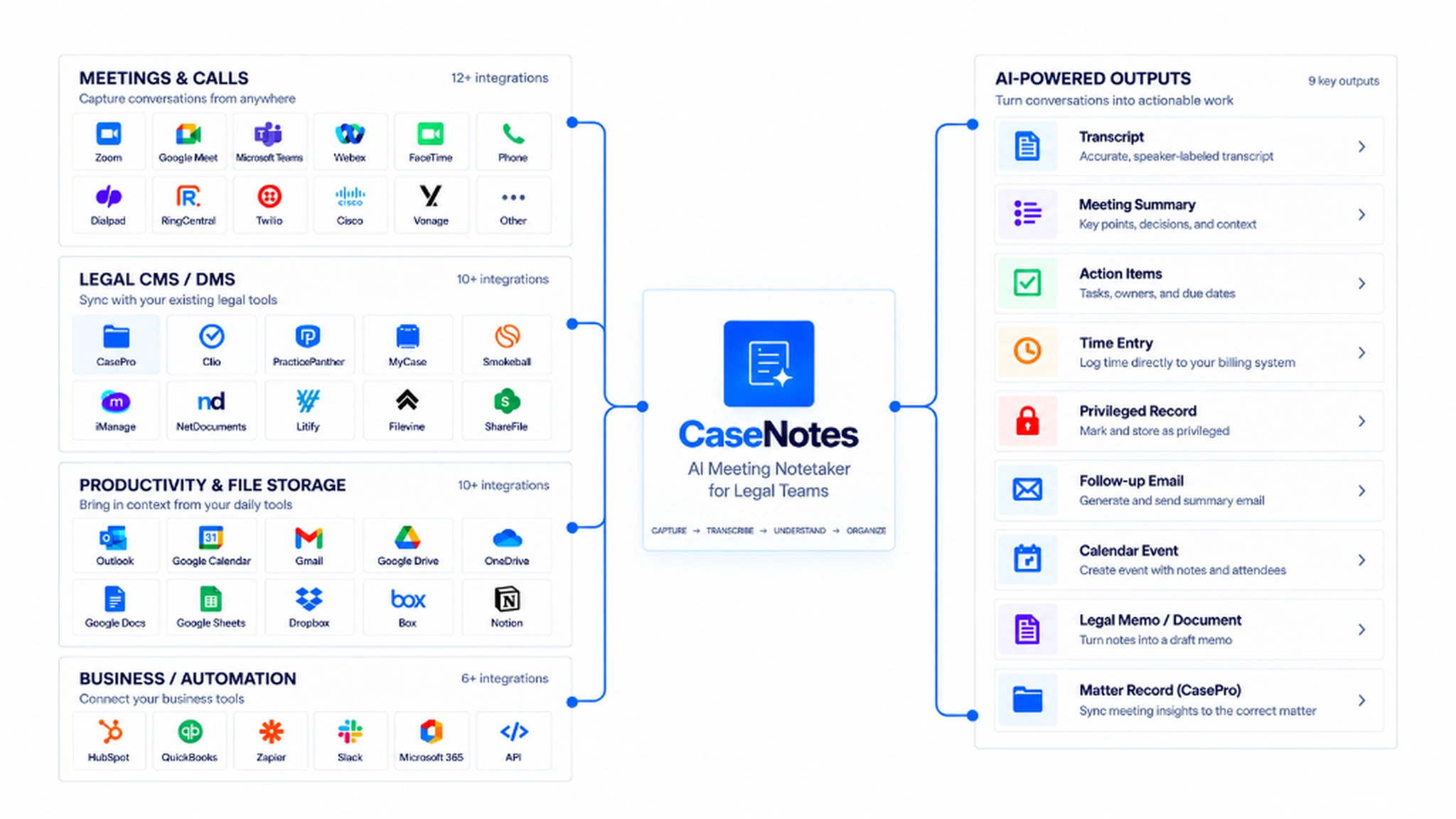
Omnis Ecosystem & Intelligence Architecture — CaseNotes bi-directional connectivity with 38+ legal CMS, DMS, communication, and productivity platforms routing into 9 structured AI matter outputs
Omnis Ecosystem & Intelligence Architecture — Bi-directional integration map connecting 38+ legal CMS, DMS, communication, and productivity platforms into CaseNotes, automatically routing structured intelligence into 9 matter-linked outputs.

Practice Management Sync

One-click push of privileged summaries, extracted deadlines, and UTBMS time entries directly into Clio, PracticePanther, and MyCase—no re-typing, no copy-paste across tabs.

Document Management

Memos, transcripts, and AI-generated summaries are securely exported to NetDocuments or iManage, inheriting the firm's existing ethical wall permissions and matter numbering.

Calendar Intelligence

Bi-directional sync with Outlook and Google Workspace ensures the AI knows which matter it's joining before the call starts—pre-loading case context, privilege rules, and attendee roles.

Omnis CRM Hub

Meeting intelligence feeds directly into the Omnis CRM—linking transcripts to client records, medical chronologies, deposition summaries, and billing data in a single unified matter timeline.

Cross-Product Intelligence

Data captured in CaseNotes enriches MedChron medical record timelines, LitDraft document generation, and DepoLink deposition workflows—creating a compound intelligence advantage across the firm.

Open API Layer

A RESTful API allows enterprise IT teams to build custom integrations—connecting CaseNotes meeting data to proprietary case management systems, conflict-check databases, and compliance reporting tools.

CaseNotes isn't a standalone recorder—it's the meeting intelligence layer for the entire Omnis legal operations platform, where every conversation becomes structured, searchable, and matter-linked data.
13 / RESULTS & IMPACT
Validation & Impact

Prototype validation with legal teams

94%
Task completion rate
(finding matter privilege status)
88%
Stated they would trust it
on privileged client calls
86/100
Usability SUS Score
across partner & associate testers
45 min
Saved per matter weekly
in note re-entry and billing prep

Key Design Decisions

Systems Over Screens

Designed an interconnected matter-linked architecture rather than generic transcription screens, supporting multi-role legal workflows.

Compliance-Led Design

Integrated ethical walls, privilege logs, and discovery defensibility into the core product rather than treating compliance as an afterthought.

Role-Specific Scoping

Created structural boundaries for four distinct user tiers, ensuring sensitive work product is never exposed to unauthorized recipients.

Most AI products treat compliance as a checkbox after design is done. In law, compliance is a design input from the first screen. Get the wrong default here and the product doesn't have a rough edge; it has a liability.
NEXT CASE STUDY

AI UX Audit: Eliminating 4+ Hours of Manual Design QA per Sprint

Designing an autonomous staging review engine that detects UI regressions, verifies accessibility, and delivers developer-ready PR reports in Slack.