

I was spending a day finding UX problems. So I built the audit engine.
At Omnis AI, I was the solo product designer across five legal-tech products. Manual staging reviews took hours and missed hidden states. I built an engine that logs in, explores interactive states, and generates developer-ready reports at ~$0.30 a screen.

Given a product URL and staging credentials, the engine logs in, explores interactive states, and outputs a self-contained report with code-level findings.
As the solo product designer across five legal-tech products at Omnis AI, I had to audit live staging apps screen by screen. Doing that manually for every release was unsustainable, so I built an automated audit engine to handle the repetitive passes.
A typical manual audit required capturing screenshots, redlining issues in Figma, cataloging tokens, and filing engineering tickets. Because fixes required complete re-verification, design QA quickly became a release bottleneck.
Problem
- Manual QA across 5 products took hours and produced inconsistent tickets.
- Interactive states (modals, validation errors, empty views) were routinely missed.
- Verifying engineer fixes required repeating the entire manual review cycle.
Solution
- Automated crawler logs in and walks every screen and interactive view.
- Applies deterministic WCAG rules and design heuristics grounded in the live DOM.
- Exports annotated reports with exact CSS selectors and remediation code.
Results
- Audits complete in ~3 minutes at ~$0.30 per screen.
- Systematic state exploration provides verified coverage across all controls.
- Engineers receive copy-paste CSS patches with before/after visual diffs.
Quality regressions lived inside interactive states.
A default dashboard layout often looked clean on initial render. Regressions appeared once a user opened a dropdown, triggered form validation errors, expanded drawer menus, or encountered empty data views.
Manual reviewers rarely had time to click through every interactive permutation on staging. Consequently, state-specific bugs consistently reached production.
Solving this required moving beyond static screenshot inspection to build a crawler capable of interacting with the live application.
Key technical hurdles for automated design QA.
Interactive State Exploration
Crawling not only initial page loads, but opening every dialog, dropdown, and tab dynamically.
DOM-Grounded Verification
Rejecting visual hallucinations by requiring every issue to anchor to an existing DOM selector.
Actionable Engineering Handoff
Providing exact line numbers, computed CSS values, and diff-ready token patches.
Deterministic Accuracy
Running code-level axe accessibility math first, reserving LLM vision strictly for semantic layout judgment.
Replacing manual design redlining with automated audit passes.
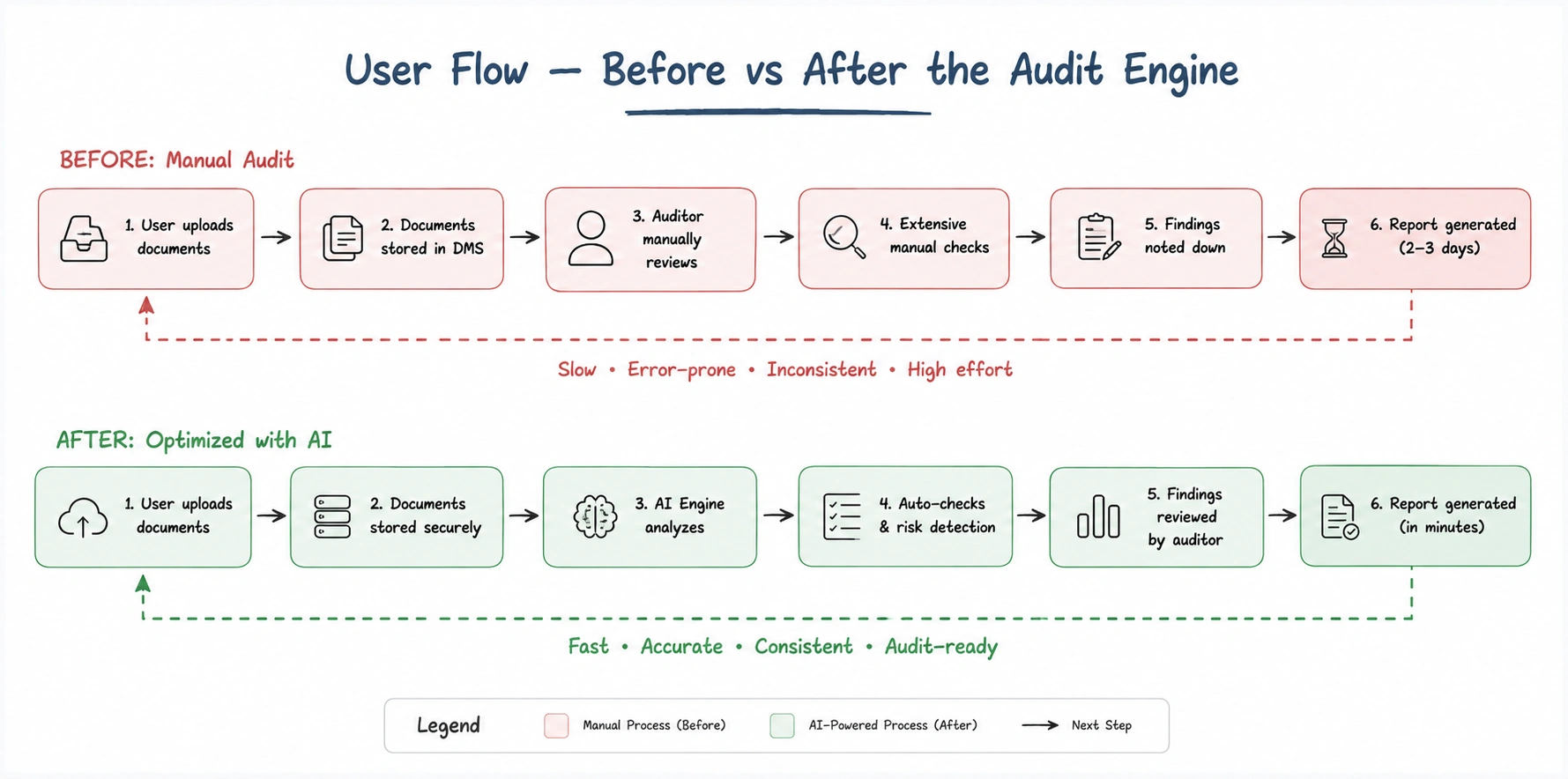
Comparing the manual review loop against the automated inspection pipeline.
- Open each staging screen manually in a browser.
- Take screenshots, paste into Figma, draw redlines and annotate notes.
- Attempt to test modals, dropdowns, and error states manually.
- Export image files and answer developer questions on specific selectors.
- Repeat the entire review from scratch after engineers push fixes.
- Run the CLI: audit <url> <credentials>
- Crawler logs in, walks every screen, and triggers all interactive controls.
- Maps findings to DOM elements, calculates contrast, and builds reports.
- Developers receive exact CSS selectors with copy-paste token patches.
- Re-auditing after a PR requires a single command with delta tracking.
| Dimension | Before · Manual | After · The Engine |
|---|---|---|
| Time per screen | ~2–3 hours of designer time | ~3 minutes |
| Cost per screen | ~$400 (designer time estimate) | ~$0.30 (compute + API) |
| Interactive states | Inconsistently checked | Every state explored |
| Consistency | Varies by reviewer bandwidth | Deterministic rule evaluation |
| Coverage record | None | Exact DOM inventory record |
| Dev handoff | Static Figma screenshot | CSS selector + diff-ready patch |
| Re-audit verification | Complete manual redo | Automated delta comparison |
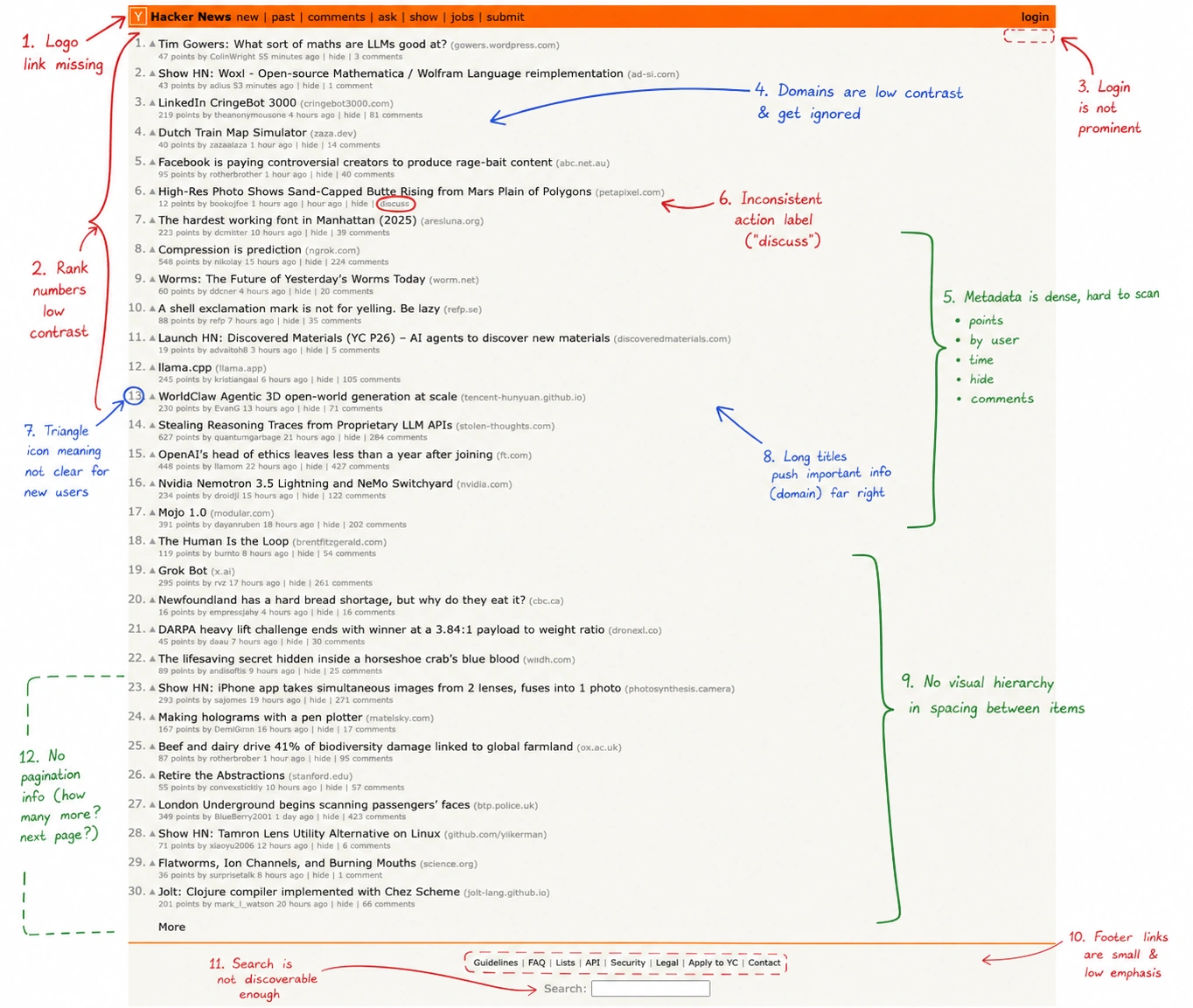
Why static screenshot analysis failed.
The initial prototype analyzed static screenshots. It produced quick lists of findings, but real-world testing revealed a critical problem.
When run against a dashboard screen I knew thoroughly, the vision model reported: "Low contrast on the secondary button beside the search field." It generated coordinates, severity, and a suggested CSS token.
That secondary button did not exist in the DOM. The vision model had hallucinated an element based on typical dashboard layout patterns. A tool that invents issues requires manual verification for every line item, wiping out the efficiency gains.
I shifted the core architectural rule: every finding must be provably grounded in a real DOM element.
Grounding findings on live DOM elements.
To eliminate phantom issues, I enforced a strict rule:
If a finding cannot be mapped to a real DOM node, the engine rejects it.
This required giving the engine live session management, computed style inspection, and coordinate snapping. Instead of guessing from screenshots, the tool collects deterministic evidence directly from the browser runtime.
The automated audit pipeline.
Today the audit pipeline runs as an automated end-to-end verification suite across staging applications:
- Handles authentication through saved session tokens, scripted login sequences, and automated fallbacks.
- Captures full-page screenshots alongside the DOM tree and runs live axe-core accessibility checks.
- Explores interactive states by triggering buttons, dropdowns, dialogs, and tabs across the interface.
- Runs deterministic rule checks (contrast math, token conformance, axe audit) alongside targeted UX heuristic lenses.
- Deduplicates findings, filters ungrounded items, and separates copy issues into a dedicated content review track.
- Generates direct CSS patch tokens for style defects with before/after visual diffs.
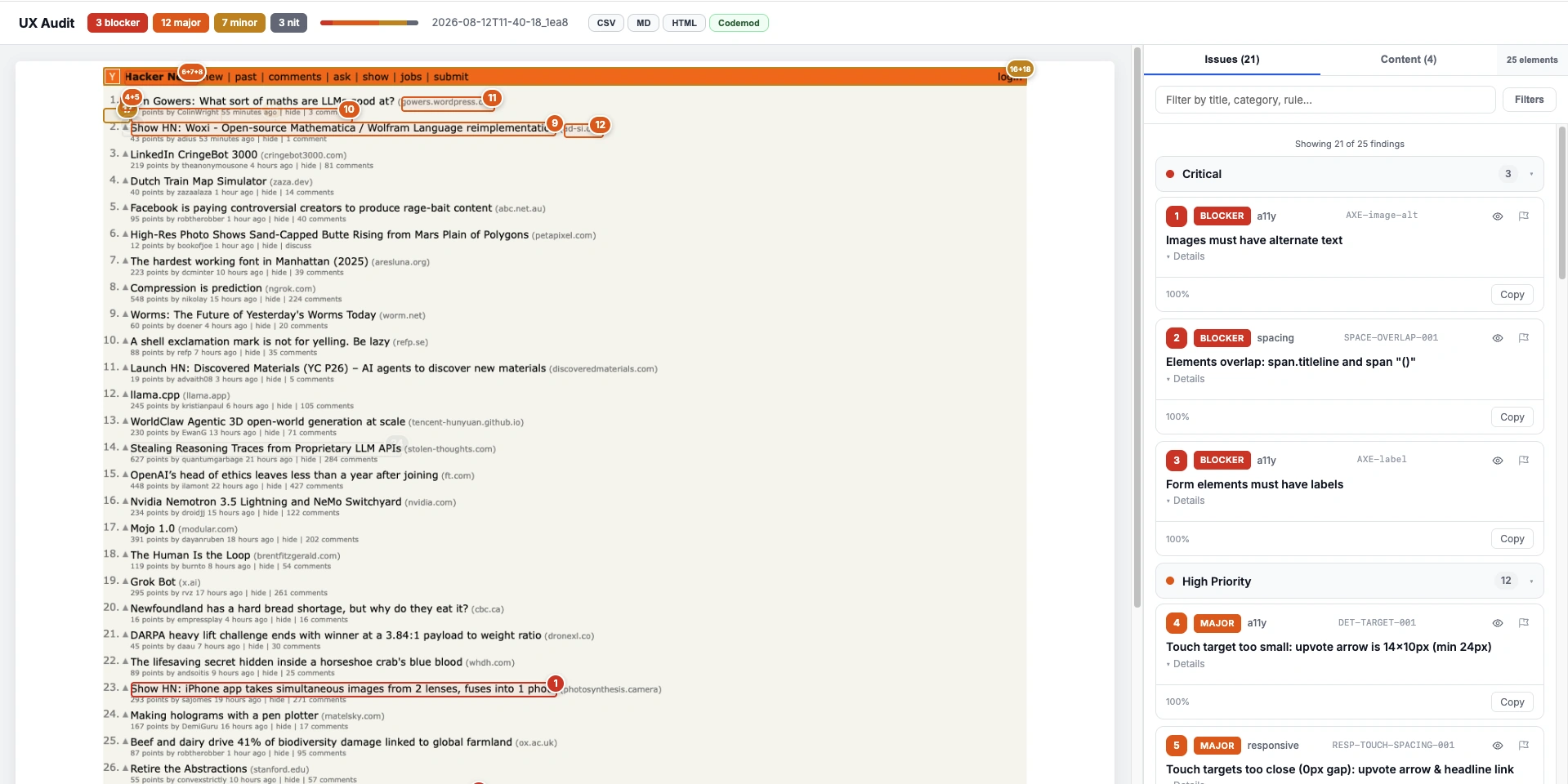
Structured finding cards for engineering handoff.
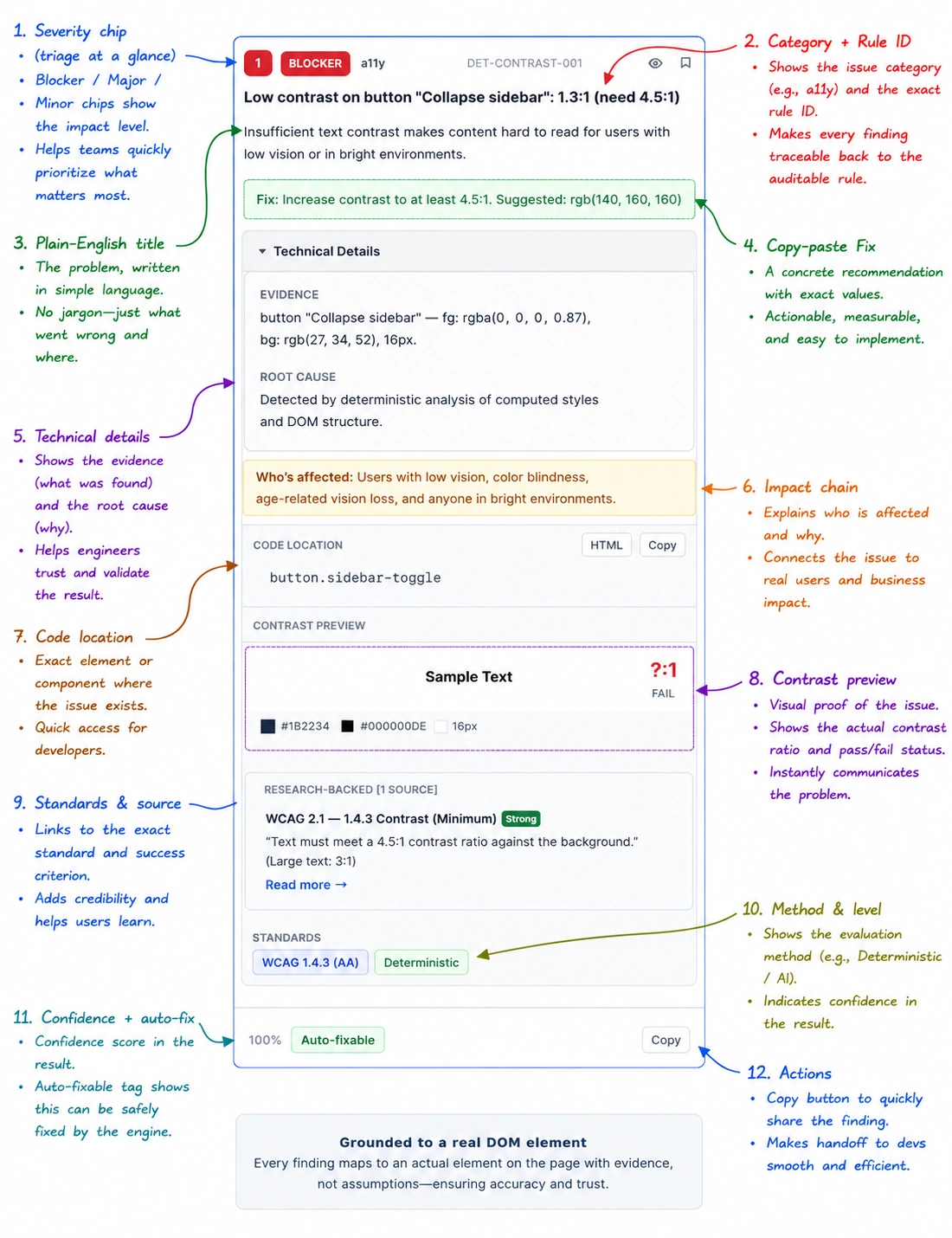
Each finding card includes a severity badge, the category and rule ID for provenance, a plain-English title, a principle reference, a copy-paste CSS fix, and a confidence score. Findings missing required evidence are filtered prior to report generation.
Two codebases.
The engine (ux-audit-mcp) handles capture and analysis. The service (ux-audit-service) provides a multi-product dashboard and CI automation.
| Layer | Technology |
|---|---|
| runtime | Node + TypeScript, Model Context Protocol (MCP) SDK |
| capture | Playwright (session management, full-page screenshots, DOM inventory, state crawler) |
| a11y | @axe-core/playwright (live axe engine execution per page) |
| ai-vision | OpenAI-compatible SDK with Gemini Flash and OpenRouter fallbacks |
| image | Sharp (annotation rendering), tesseract.js (OCR coordinate snapping), pixelmatch (diffing) |
| service | Next.js 16, React 19, Tailwind 4, Prisma 7 + Postgres, BullMQ + Redis, GitHub Actions, Docker |
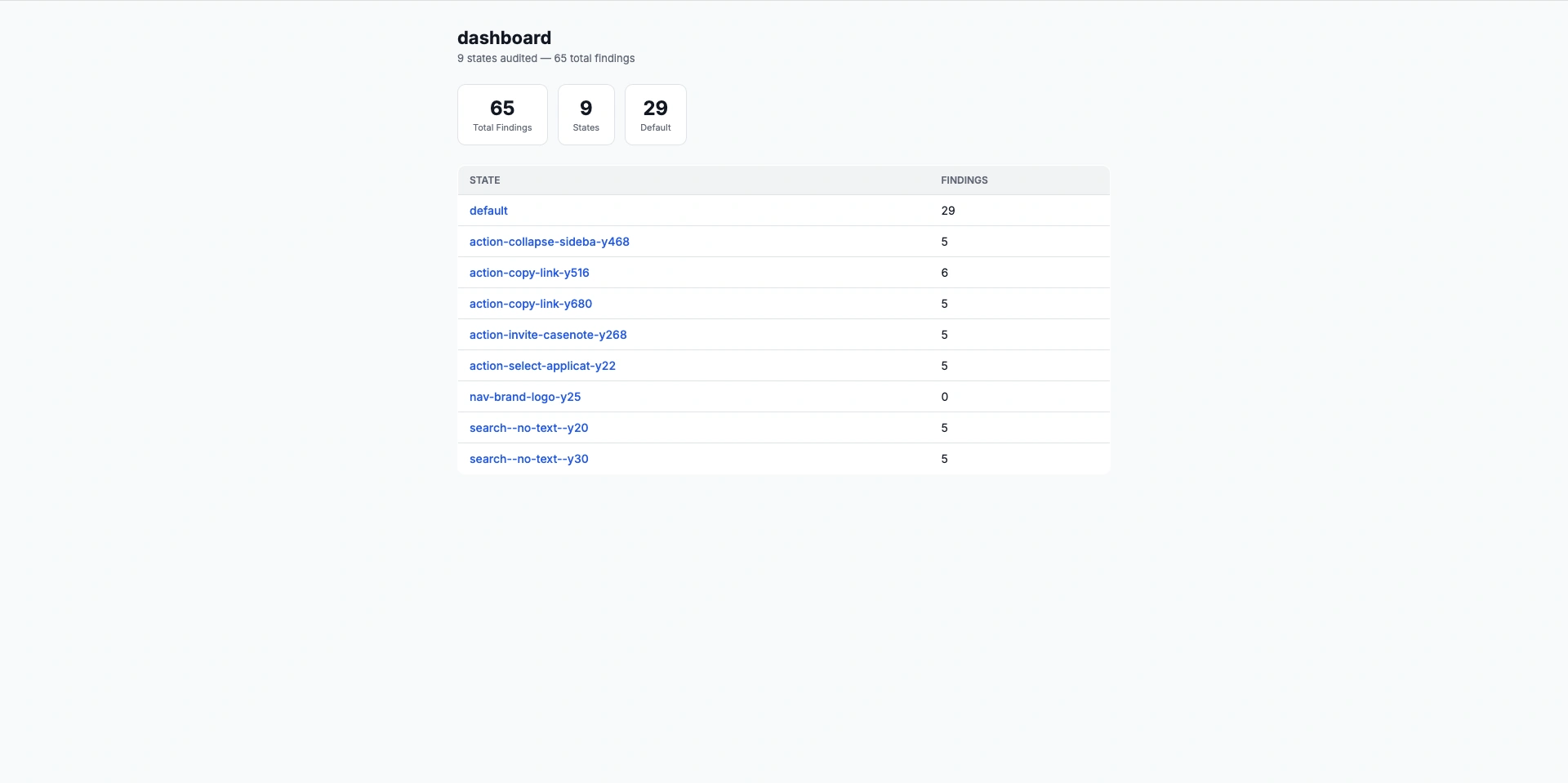
One audit run. Six distinct stakeholder views.
Findings are routed into targeted views tailored for each team member:
- Product Designer: high-level severity breakdown and design token mismatches; rejecting false positives creates persistent exclusion rules.
- Frontend Developer: blocker views with DOM selector paths, computed style properties, and verified CSS patches.
- QA Engineer: interactive state logs that expose dialog, drawer, and dropdown regressions missed by static tests.
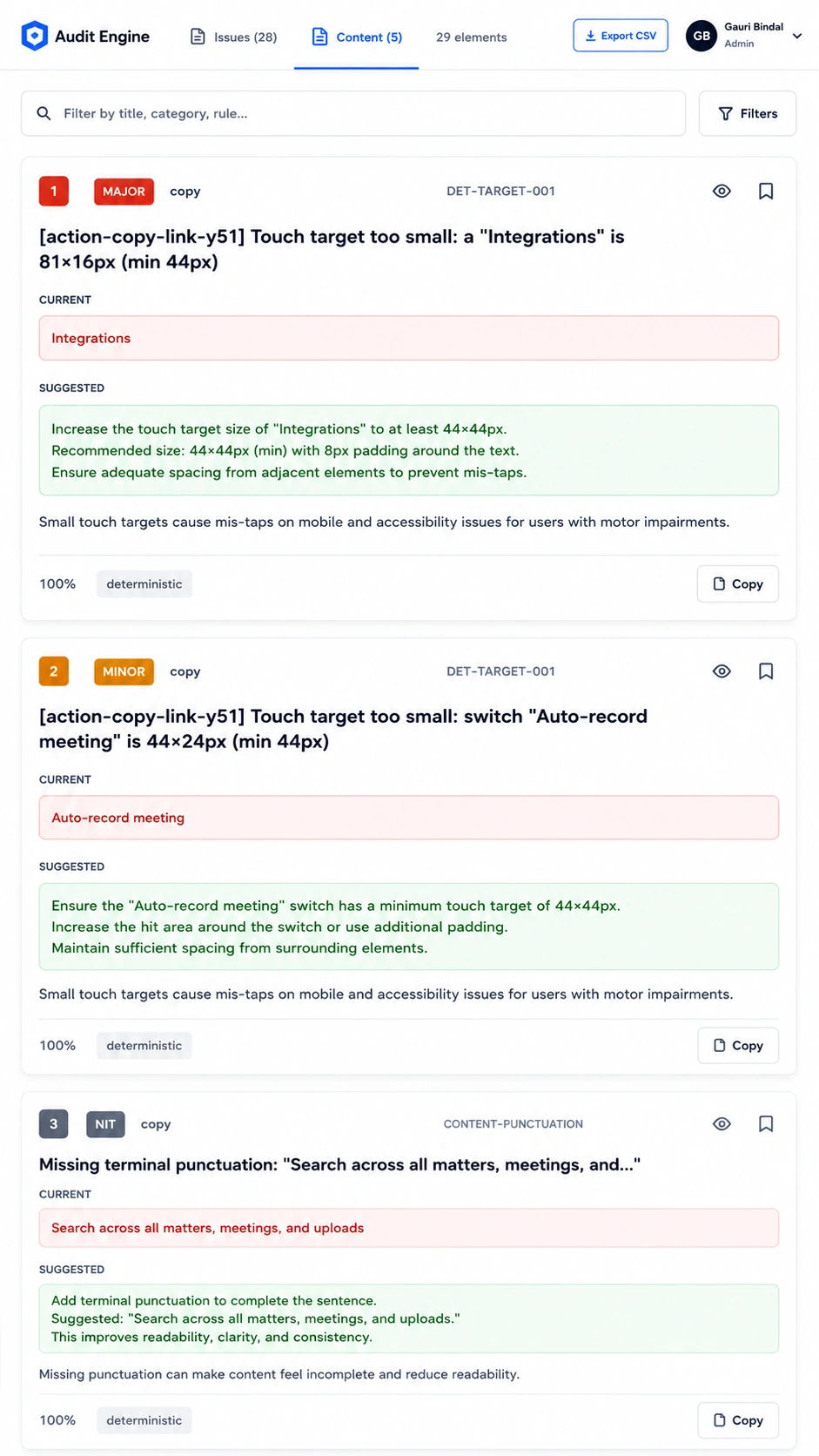
- Content Designer: dedicated copy track highlighting confusing labels alongside standardized UX copy suggestions.
- Engineering Manager: aggregate fleet dashboard and CI release gates that block pull requests with new critical defects.
- Leadership: quantitative compliance records showing regression resolution over time across all products.
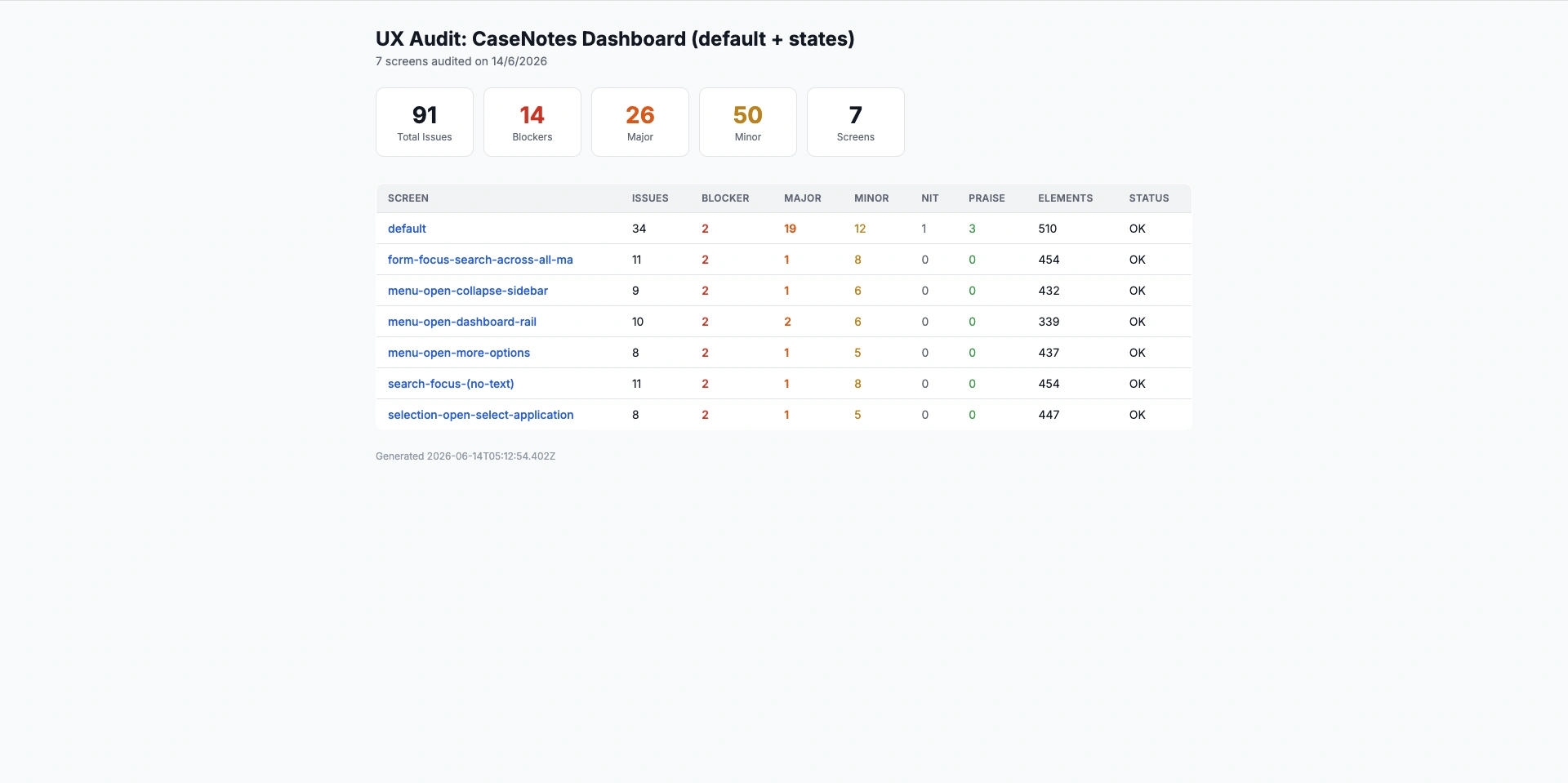
In practice, a single run on CaseNotes produced 89 findings categorized across 35 deterministic accessibility rules, 45 heuristic design checks, and 22 copy suggestions, allowing each contributor to filter directly to their own tasks.
Eliminating false positives through deterministic checks.
Generating high finding counts is trivial. Generating reliable findings requires multi-tiered verification before any defect reaches a report.
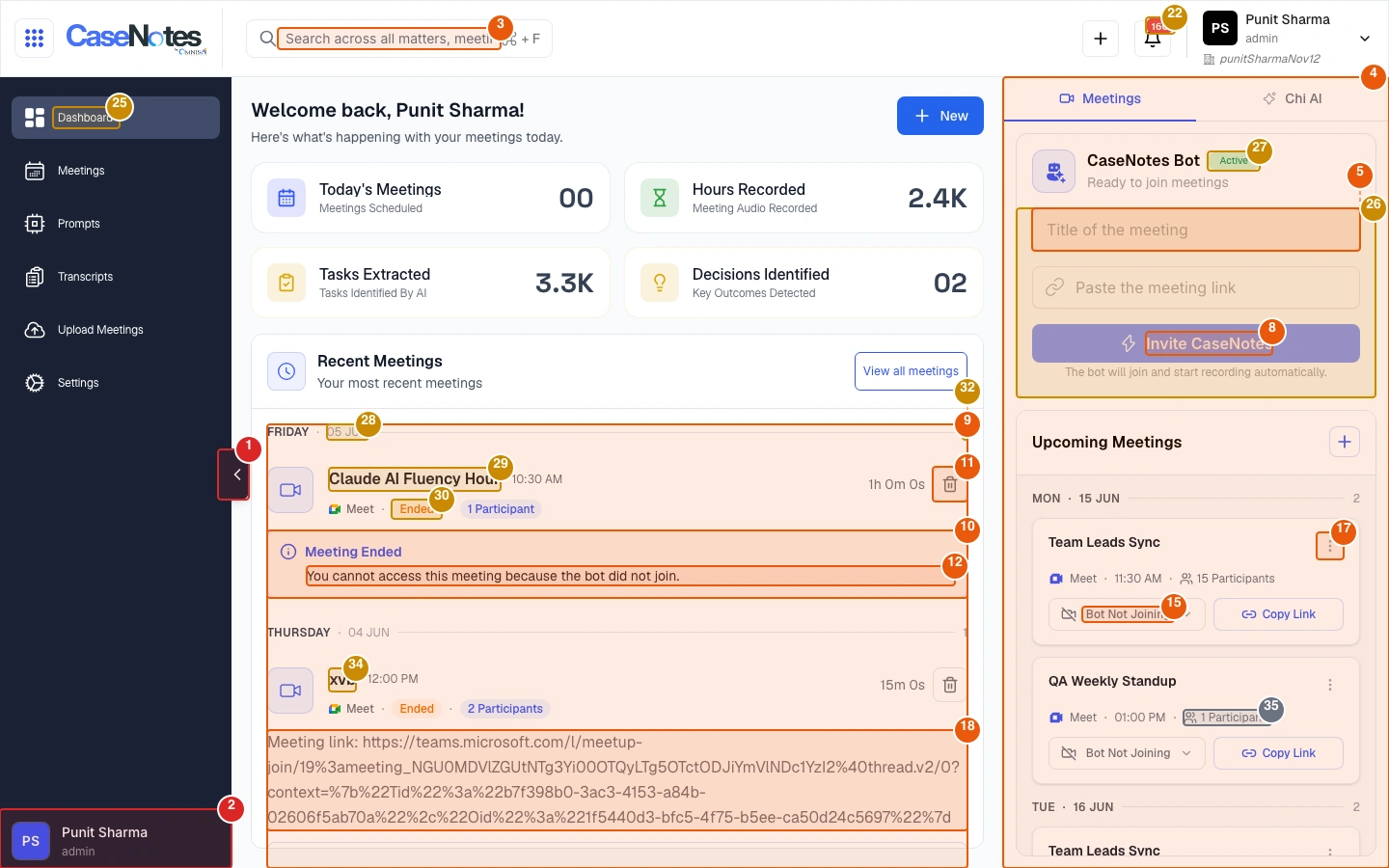
- DOM Grounding: every finding maps directly to a verified DOM node. Unanchored visual observations are automatically dropped.
- Layered Verification: 229 hardcoded rules execute code-level checks at zero compute cost; LLM vision functions purely as a secondary check for contextual layout issues.
- Explicit Provenance: all heuristic findings cite specific WCAG criteria or design guidelines alongside computed confidence ratings.
- Exclusion Rules: designer rejections are permanently recorded as exclusion rules in the repository configuration.
- Deterministic Patching: style remediation provides before/after visual diffs; layout recommendations are marked clearly for human review rather than faked as solved.
Measured impact on staging applications.
On our CaseNotes staging app, a 4-screen audit identified 89 issues across 22 interactive states in ~11 minutes for ~$1.20 in compute and API costs. The run inspected 1,035 elements, auto-remediated 26 token mismatches, and filtered out 800+ redundant duplicate triggers. On AutoDoc, the engine identified 87 categorized findings across blocker, major, minor, and nit categories.
The engine also handles edge conditions gracefully: generating empty passing reports for compliant pages and falling back to saved session cookies when authentication challenges occur.
per screen, in ~3 min
Measured compute and API cost. Manual designer reviews averaged 2 to 3 hours per product.
interactive state coverage
Crawls all active buttons, modals, dropdowns, and form validation states.
DOM-anchored findings
Every defect card links directly to an existing DOM selector path.
Self-contained report formats.
The pipeline outputs complete audits as standalone HTML dashboards and Markdown files formatted for GitHub pull requests and Linear tickets.
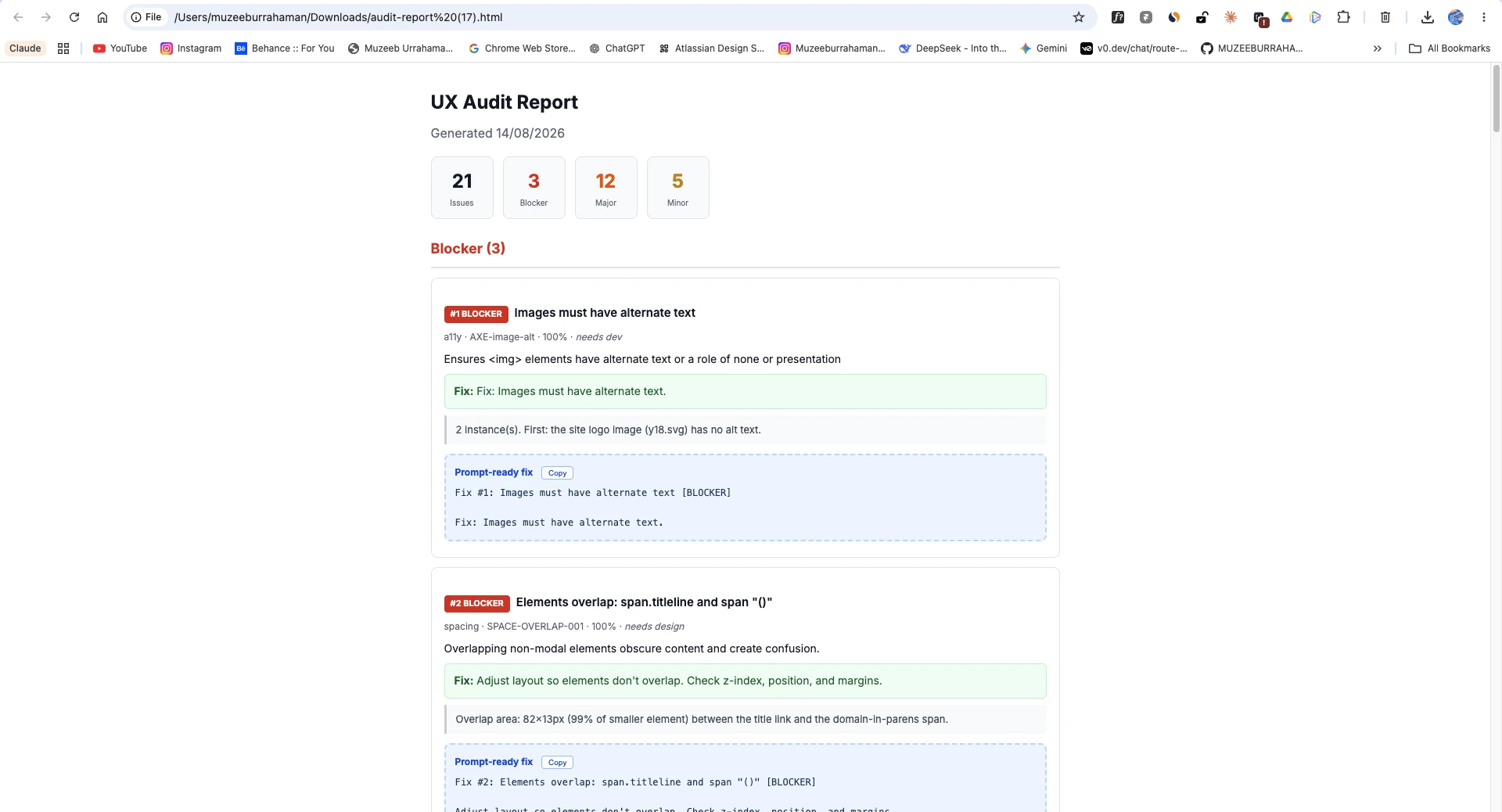
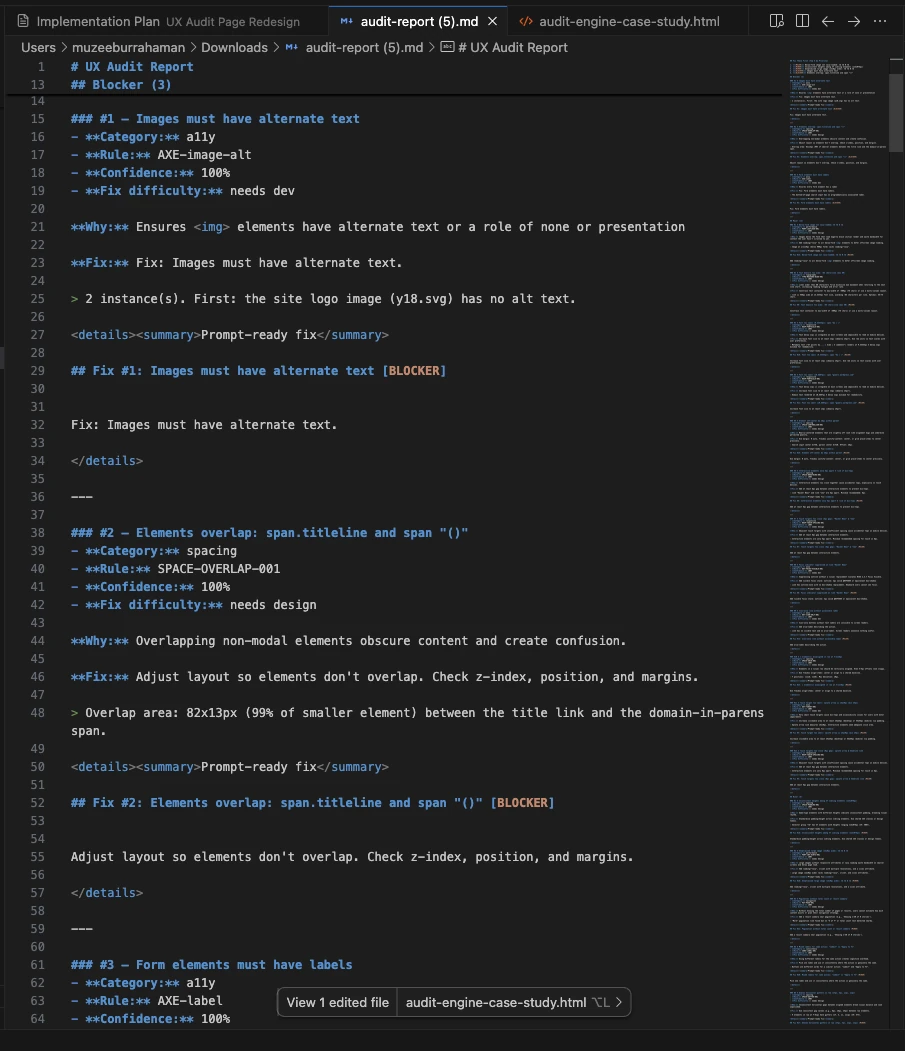
Download the UX Audit Assistant Skill.
I packaged the heuristics engine, WCAG 2.2 accessibility rules, DOM state exploration prompts, and report markdown templates into a drop-in Claude and AI agent skill bundle. Download the package to run automated design reviews in your own workflow.
UX Audit Assistant Agent Skill
Drop-in skill for Claude Code, Cursor, and custom agent loops. Automates design QA and generates grounded finding cards from real DOM states.
Direct download. Compatible with Claude Code, Cursor, Windsurf, and custom agent workflows.
Core takeaways from building automated audit tools.
Automated design QA requires balancing speed with strict verification:
- Grounding is non-negotiable: A tool that reports 50 issues with 15 hallucinations wastes more time in triage than a manual audit. Anchor every finding directly to a selector.
- Coverage requires state interaction: Testing initial views misses dropdown overflow, validation errors, and empty states. Real QA requires interacting with controls.
- Output must be diff-ready: Vague heuristic critiques get deprioritized. Providing computed CSS properties, DOM selectors, and token patches leads to immediate pull request merges.
Production readiness and scope boundary.
The system is a fully functional engineering prototype with 187 automated tests and ~27,000 lines of TypeScript. Following company restructuring and staging environment changes, further enterprise-scale validation remains open.
Next engineering steps include multi-tenant baseline tracking, automated regression alerting, and direct Figma annotation synchronization.
If I picked this back up.
The project is currently parked, not active (see §13). This isn't a committed roadmap, it's what I'd build next if I resumed it.
- Phase 1: Baseline Tracking: automated initial crawl establish product baselines to flag regressions on future runs.
- Phase 2: CI Integration: GitHub Actions integration that runs audits on staging deploys and flags new blockers directly on pull requests.
- Phase 3: Remediation Verification: automated re-crawling following PR merges to confirm target defects have been resolved.
- Phase 4: Figma Canvas Sync: pushing verified staging annotations directly onto design system canvas files via Figma REST APIs.
